
HPLC / UHPLC Solvent Effect Solution
Peak Smooth Column for HPLC Sample Solvent Mismatch
Reduce peak splitting, fronting and broadening caused by injection solvent effects and sample diluent / mobile phase mismatch.
- HPLC / UHPLC pressure options
- Inline install after the injector
- Three body types, nine catalog models
- OEM & custom connection options
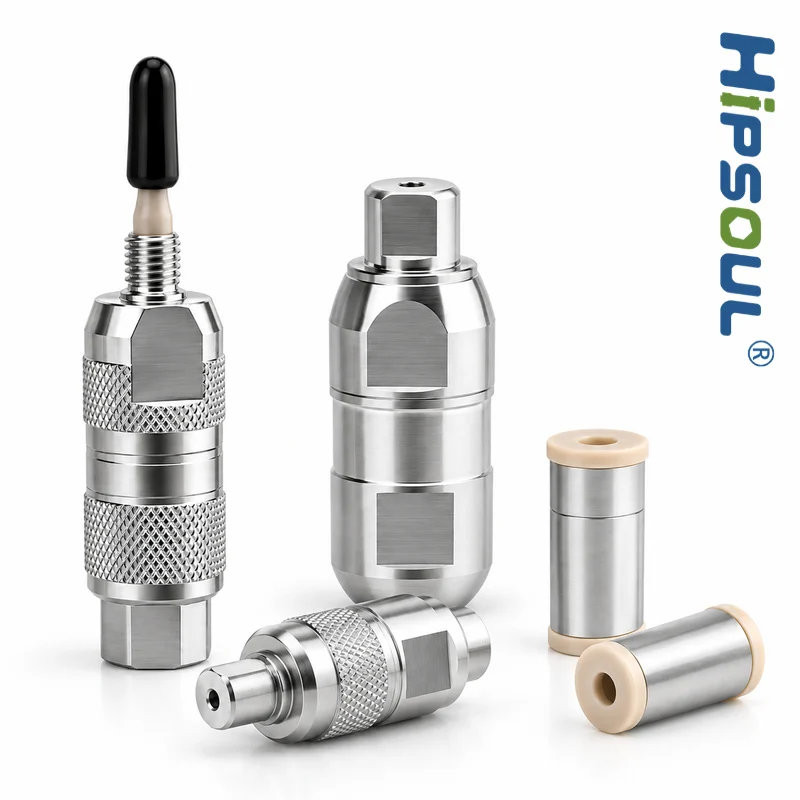
HPLC / UHPLC Compatible
Easy Inline Installation
25 / 47 / 58 μL Volumes
OEM & Custom Options
Find the Right Peak Smooth Column
Start with your LC system pressure class, then choose an internal volume. Models below are from the current solvent-effect eliminator catalog.
Step 1 – Your system
Conventional HPLC: Direct-connect HPLC / UHPLC: Rotary High-pressure UHPLC: Compact rotary
Step 2 – Internal volume
Not sure which type?
Send your system pressure, fittings, sample diluent and a chromatogram. We will help match a catalog model.
Are Your Peak Problems Caused by the Sample Solvent?
Poor peak shape does not always mean the analytical column is damaged.
Peak splitting
Split or doubled peaks, often worse for early-eluting compounds.
Peak fronting
The peak leans forward when the inlet band is not focused cleanly.
Peak broadening
Wider, lower peaks when the sample plug spreads before focusing.
Shoulder peaks
A shoulder can appear when part of the plug migrates ahead of the focused band.
Early-eluting resolution loss
Compounds near the void are usually the first to show injection solvent mismatch.
- Sample Solvent
- Injection
- Solvent Mismatch
- Poor Focusing
- Peak Distortion
Also rule out overload, contamination, extra-column volume, poor fittings, column damage and secondary interactions.
What Is the Sample Solvent Effect in HPLC?
The injected sample diluent temporarily becomes part of the chromatographic environment. If it differs from the initial mobile phase, focusing and early retention can change.
Also called an injection solvent effect, strong solvent effect, or sample diluent mismatch. Read the technical guide →
- Sample diluent
- Initial mobile phase
- Sample Vial
- Injector
- Sample Plug
- Mobile Phase
- Analytical Column
- Mismatch → Distorted band
- Match → Focused band
Why Solvent / Mobile Phase Mismatch Distorts Peaks
Distortion appears when the diluent differs enough from the initial mobile phase to alter focusing, transfer or retention at the column inlet.
Solvent strength
A stronger diluent may reduce analyte focusing at the column inlet.
Compatibility
Poor miscibility or composition differences can disrupt sample transfer.
Solubility & state
Analyte solubility or ionization can differ between diluent and mobile phase.
Traditional Fixes: When They Are Not Practical
Reduce injection volume
Often improves focusing, but may reduce sensitivity.
Match diluent to mobile phase
Preferred when method and solubility allow it.
Dilute or reconstitute
Can lower organic strength, but adds prep time and handling risk.
These approaches are not always practical.
- Validated methods may restrict sample-prep changes
- Sample solubility may be poor in the initial mobile phase
- SPE / QuEChERS extracts may stay high in organic solvent
- Reducing injection volume may sacrifice sensitivity
A Hardware Approach to Sample Solvent Mismatch
Meet the uHPLCs Peak Smooth Column
Installed between the injector and analytical column, it moderates differences between the injected sample solvent and the initial mobile phase before the sample reaches the column.
- Reduce injection solvent effects in suitable methods
- Improve peak symmetry when mismatch is the cause
- Support practical injection volumes when diluent cannot change
- Not an analytical column and not a cure for every peak issue
Results depend on analyte chemistry, diluent, mobile phase, injection volume, column dimensions and system volume.
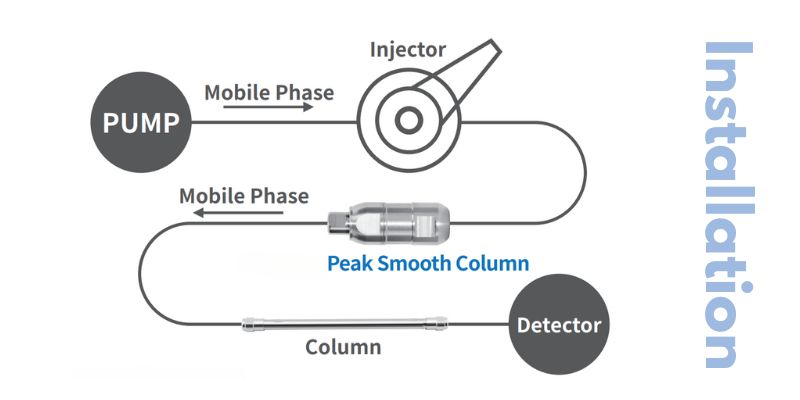
How the Peak Smooth Column Works
- Mobile Phase
- Pump
- Injector
- Peak Smooth Column
- Analytical Column
- Detector
Flow direction: injector → Peak Smooth Column → analytical column. Not installed in the solvent bottle or upstream of the injector.
1. Sample injection
The sample plug enters the flow path from the injector.
2. Solvent moderation
Abrupt differences between diluent and mobile phase environment are reduced.
3. Column entry
The sample reaches the analytical column under a more favorable focusing environment when mismatch was limiting.
See the Difference in Peak Shape
Before: solvent mismatch
Split, fronting or broad peaks can appear when the injection solvent is stronger or incompatible with the initial mobile phase.
After: with Peak Smooth Column
In suitable methods, peaks may become sharper and better focused. Improvement is not guaranteed for every chromatogram.
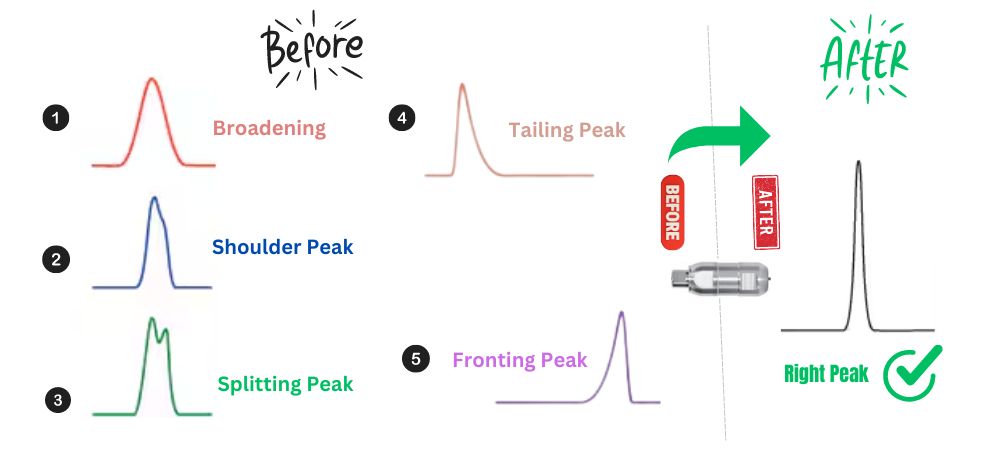
Illustrative chromatograms. Actual improvement depends on analyte chemistry, sample solvent, mobile phase, injection volume, column dimensions and chromatographic conditions.
Choose the Right Peak Smooth Column
Three independent body types for conventional HPLC and high-pressure UHPLC workflows.
Connection thread, housing material and PEEK / bio-compatible variants are confirmed on the RFQ when not listed in the catalog table.
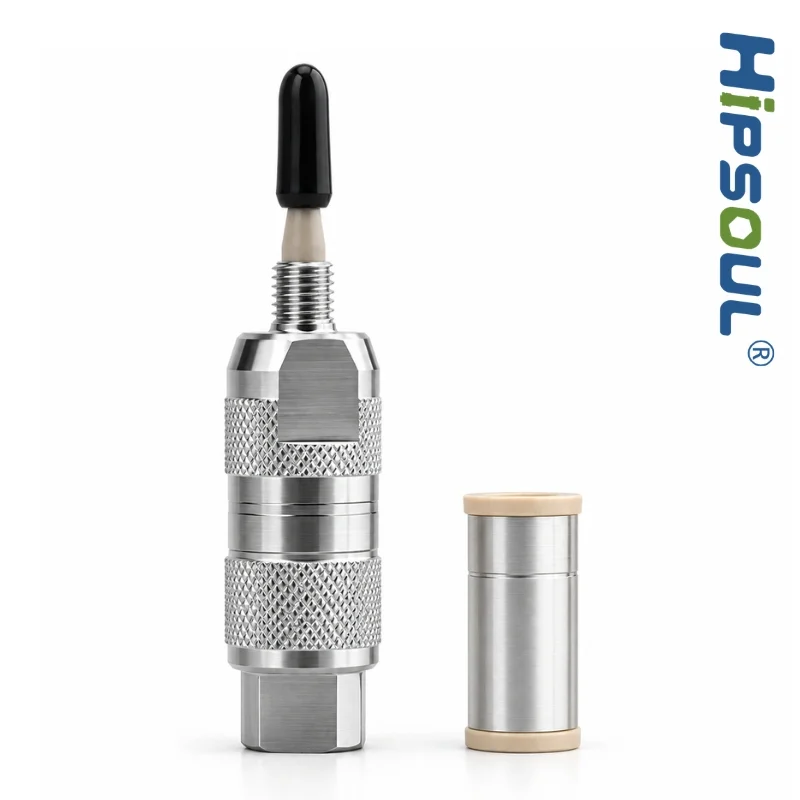
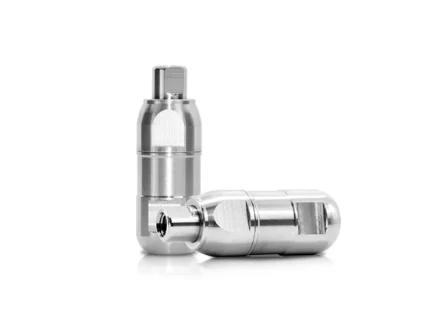
Direct-connect Peak Smooth Column
- Internal volume 25 / 47 / 58 μL
- Recommended system Conventional HPLC
- Models
P3F0B-00382P3F0B-00383P3F0B-00336 - Connection / material Request specifications
Inline hardware for HPLC methods within the listed 80 MPa rating.
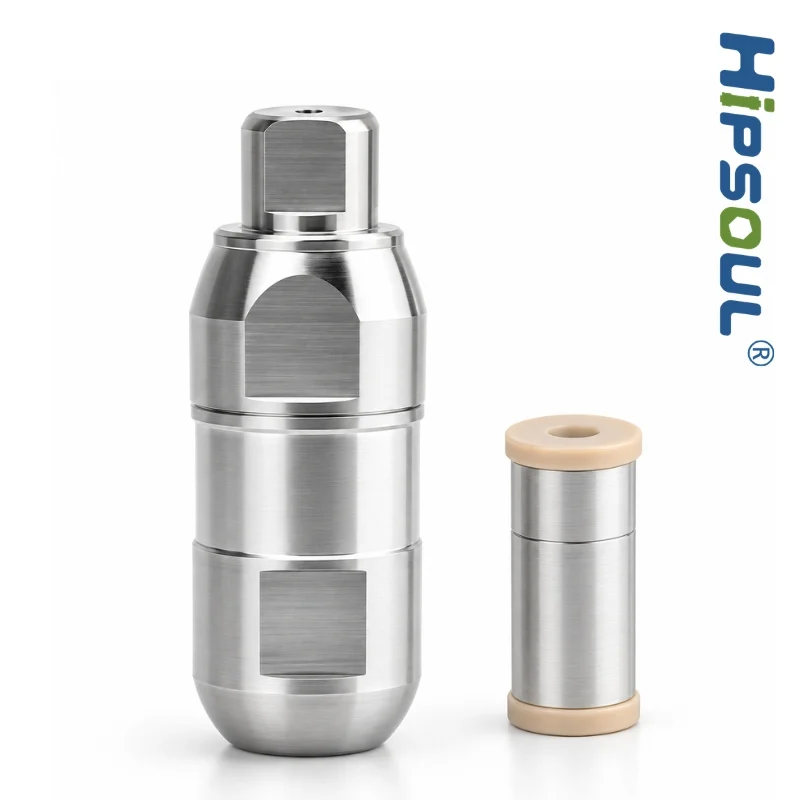
Rotary Peak Smooth Column
- Internal volume 25 / 47 / 58 μL
- Recommended system HPLC / UHPLC
- Models
P3F0B-00320P3F0B-00352P3F0B-00349 - Connection / material Request specifications
Rotary body for higher-pressure HPLC and UHPLC workflows within 100 MPa.
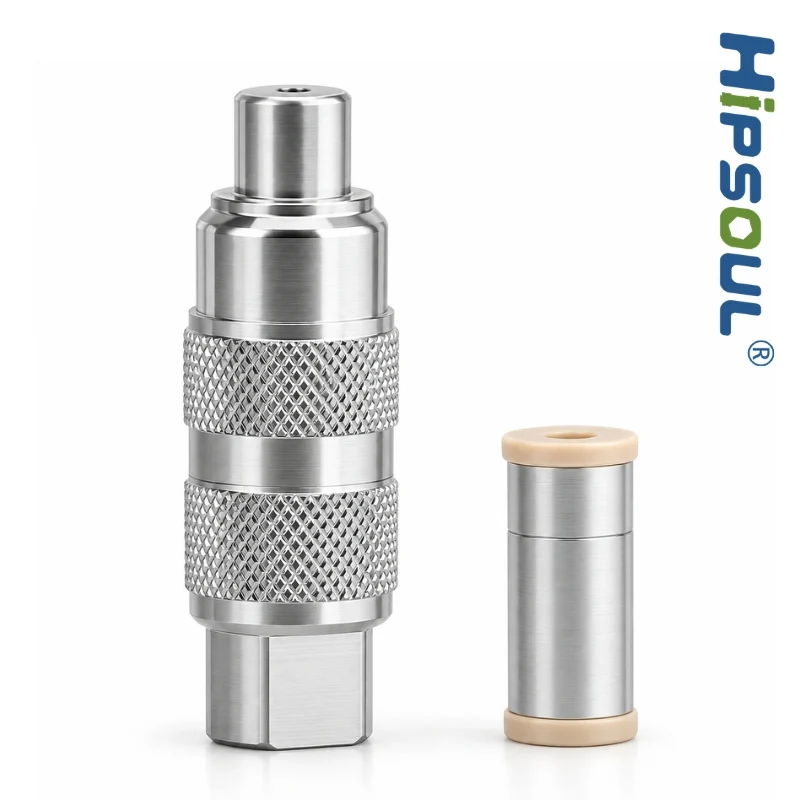
Compact rotary Peak Smooth Column
- Internal volume 25 / 47 / 58 μL
- Recommended system High-pressure UHPLC
- Models
P3F0B-00384P3F0B-00385P3F0B-00370 - Connection / material Request specifications
Smaller rotary body listed at 100 MPa for compact high-pressure layouts.
Full model table
| Model | Type | Maximum pressure | Internal volume | Recommended system | Action |
|---|---|---|---|---|---|
| P3F0B-00382 | Direct-connect | 80 MPa | 25 μL | Conventional HPLC | Request specifications |
| P3F0B-00383 | Direct-connect | 80 MPa | 47 μL | Conventional HPLC | Request specifications |
| P3F0B-00336 | Direct-connect | 80 MPa | 58 μL | Conventional HPLC | Request specifications |
| P3F0B-00320 | Rotary | 100 MPa | 25 μL | HPLC / UHPLC | Request specifications |
| P3F0B-00352 | Rotary | 100 MPa | 47 μL | HPLC / UHPLC | Request specifications |
| P3F0B-00349 | Rotary | 100 MPa | 58 μL | HPLC / UHPLC | Request specifications |
| P3F0B-00384 | Compact rotary | 100 MPa | 25 μL | High-pressure UHPLC | Request specifications |
| P3F0B-00385 | Compact rotary | 100 MPa | 47 μL | High-pressure UHPLC | Request specifications |
| P3F0B-00370 | Compact rotary | 100 MPa | 58 μL | High-pressure UHPLC | Request specifications |
Bio-compatible / PEEK hardware is not in the current nine-model table. If a PEEK or inert flow path is required, send the system and wetted-material constraint with the RFQ.
Is Your Peak Problem Really a Solvent Effect?
If several of these conditions apply, sample solvent mismatch should be investigated.
- Peak shape worsens as injection volume increases
- Sample is dissolved in high-organic solvent
- Initial mobile phase is highly aqueous
- Peak shape improves when using initial mobile phase as sample diluent
- Peak shape improves after reducing injection volume
- Early-eluting compounds are most affected
Where Peak Smooth Columns Can Help
Pharmaceutical QC
When validated methods limit changes to sample preparation or diluent.
Method development
Evaluate and troubleshoot sample solvent effects during optimization.
Food & residue analysis
Useful for high-organic extracts such as SPE / QuEChERS workflows.
LC-MS / LC-MS/MS
Evaluate in solvent-sensitive workflows where method changes are limited.
CRO laboratories
Reduce troubleshooting time across diverse methods and matrices.
OEM / private label
Custom connections and labeling can be quoted for target systems.
Peak Smooth Column vs Traditional Solutions
Matching the sample diluent to the initial mobile phase remains preferred whenever practical. The Peak Smooth Column is an alternative when method or prep changes are difficult.
| Solution | Method change | Sample prep time | Sensitivity impact | Hardware |
|---|---|---|---|---|
| Reduce injection volume | Yes | Unchanged | May reduce signal | No |
| Change sample diluent | Yes | May increase | Depends on solubility | No |
| Evaporate and reconstitute | Yes | Increases | Can concentrate or lose analyte | No |
| Peak Smooth Column | Usually none | Unchanged | May keep a practical injection volume | Yes |
Why Choose uHPLCs for Solvent-Effect Hardware?
Chromatography hardware focus
Peak Smooth Columns sit with Ghost Buster Columns, guard columns and inline filters as flow-path hardware.
HPLC and UHPLC options
Catalog ratings: 80 MPa direct-connect; 100 MPa rotary and compact rotary.
Application support
Send a chromatogram, sample solvent, mobile phase and injection volume for a mismatch review.
HPLC Sample Solvent Effect FAQs
What is the solvent effect in HPLC?
The solvent effect in HPLC is the influence of the injected sample diluent on peak shape, focusing and early retention. It becomes a problem when that diluent differs enough from the initial mobile phase to change how analytes enter the analytical column. Matching the diluent to the starting mobile phase is the preferred fix when the method allows it.
What causes sample solvent mismatch in HPLC?
Sample solvent mismatch occurs when the injection solvent differs from the initial mobile phase in elution strength, composition or miscibility. Large injection volume, weakly retained analytes and short UHPLC columns make the mismatch more visible. Other hardware and method issues should still be ruled out.
Can a strong sample solvent cause peak splitting?
Yes. A sample diluent stronger than the initial mobile phase can prevent the analyte from focusing as a single band at the column inlet. Split peaks also have other causes, including extra-column volume, poor fittings and column damage, so solvent mismatch should be confirmed rather than assumed.
What is a Peak Smooth Column?
A Peak Smooth Column is a flow-path device installed between the injector and the analytical column. It is offered as hardware for HPLC sample solvent mismatch and injection solvent effects, not as a replacement analytical column. Catalog types are direct-connect (80 MPa) and rotary / compact rotary (100 MPa), each in 25, 47 and 58 μL internal volumes.
Where is the Peak Smooth Column installed?
Install it in the high-pressure flow path after the injector and before the analytical column, in the direction of flow. It is not a reservoir inlet filter, not a Ghost Buster Column, and not a conventional guard column.
Can a Peak Smooth Column be used with UHPLC?
Use a catalog option whose listed pressure covers the method. Rotary and compact rotary models are listed at 100 MPa. Direct-connect models are listed at 80 MPa and should not be used above that rating. Confirm fittings and analytical-column ID with the RFQ.
How do I know whether my peak problem is caused by solvent mismatch?
Solvent mismatch is more likely when peak shape worsens as injection volume increases, the sample is in a high-organic diluent, the initial mobile phase is highly aqueous, early-eluting peaks are worst, or the chromatogram improves after diluting in the starting mobile phase. Send a chromatogram and method conditions for a review rather than assuming the hardware will correct every distortion.
Can it be used for LC-MS/MS?
It can be evaluated in solvent-sensitive LC-MS or LC-MS/MS workflows where injection solvent mismatch is suspected and method changes are limited. Suitability depends on pressure, fittings, extra-column volume and whether the peak issue is actually a solvent effect. This page does not claim a universal LC-MS result.
Related HPLC Peak Troubleshooting Guides
Sample solvent and peak shape
Sample solvent effects in HPLC for focusing, strong-solvent checks and method options.
Peak shape troubleshooting
HPLC peak shape troubleshooting, plus fronting and peak splitting.
Related hardware
Guard columns, inline filters, Ghost Buster Columns, and OEM / custom.
Still Fighting Split, Fronting or Broad HPLC Peaks?
Send your chromatogram, sample solvent, mobile phase and injection conditions. We can help evaluate whether sample solvent mismatch may be contributing.
Prefer email? [email protected]